Claude Opus 4.7 is out. It’s better at coding. It’s better at following precise instructions. It’s harder to prompt. It produces better work, but it takes longer to do it.
If that list sounds familiar, it should. It’s the exact same pitch OpenAI made when they launched GPT‑5 last year. That’s not a coincidence — it’s a playbook, and both companies are running it for the same reason.
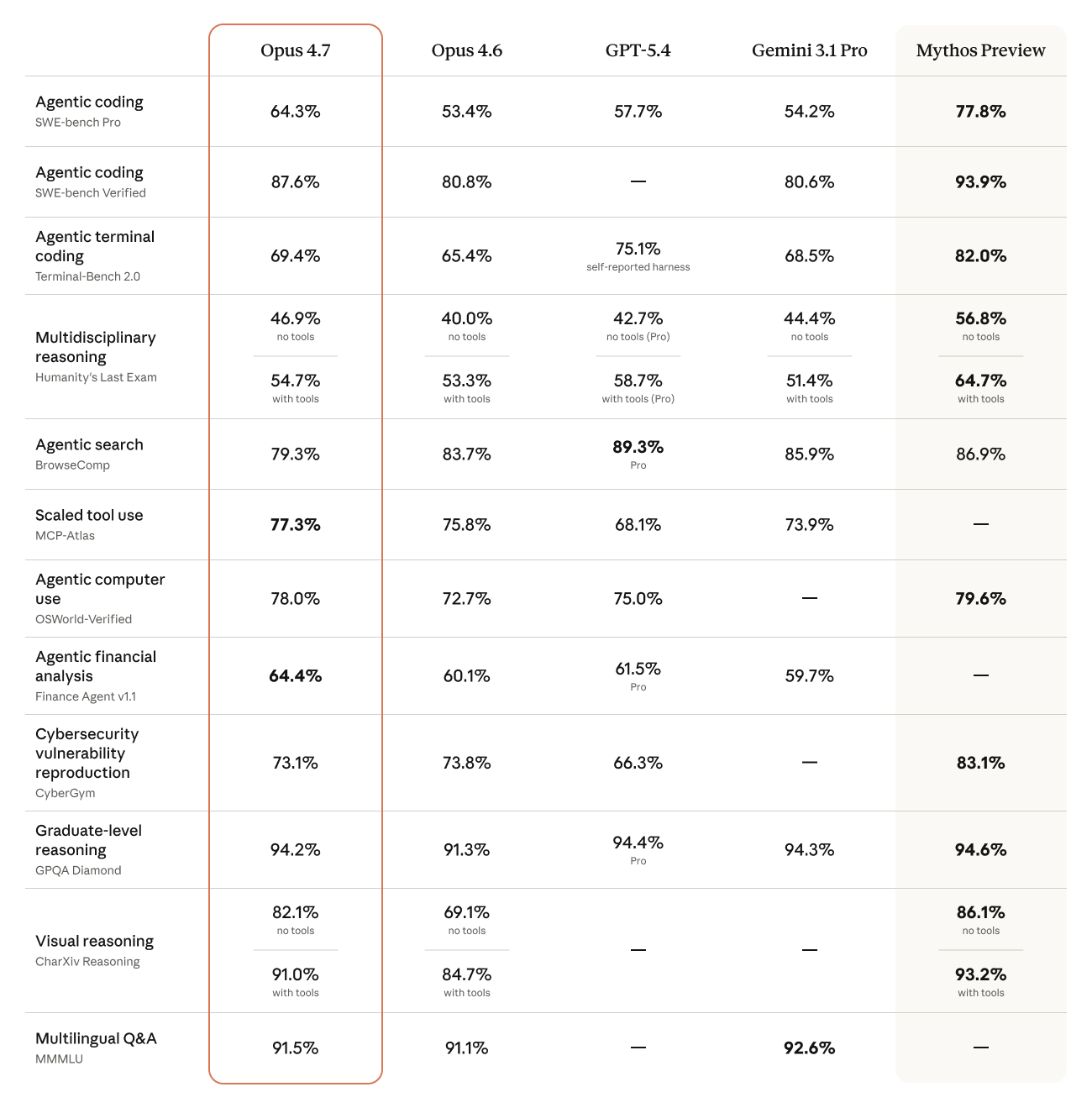
Opus 4.7 benchmark chart. Source: Anthropic.
The Compute Story Nobody Is Saying Out Loud
The headline feature in 4.7 is adaptive thinking. Instead of a fixed reasoning budget like 4.6’s extended thinking, 4.7 decides for itself how many tokens to spend on each query. Simple question? Short answer. Complex task? The model digs in. In the API docs, Anthropic removed the old budget_tokens parameter entirely. Set it and you get a 400 error.
The framing is “the model is smarter about when to think.” The reality is also that Anthropic gets to save chips on every easy query. Every time Opus 4.7 decides not to reason, that’s GPUs they get to redirect elsewhere. GPT‑5’s auto‑router did the exact same thing — quietly serving a smaller model on most questions so OpenAI could keep the lights on.
This isn’t conspiracy-theory territory. Fortune reported that Marc Andreessen publicly questioned whether Anthropic is holding back Mythos, their more powerful frontier model, because of cybersecurity risk or because they don’t have the chips to serve it. Anthropic themselves admitted Mythos is “extremely compute-intensive and expensive to run” and they’re working on efficiency before any general release. Users have noticed the outages and peak-hour rate limits on their end too.
Translation: adaptive thinking in 4.7 is both a genuine research improvement and a compute‑rationing mechanism. Both things are true. If you’re planning agentic workloads on 4.7, factor that in — you don’t fully control how much reasoning you get.
4.6 vs 4.7: It Takes Different Prompting
I’ve been running the same work prompts through 4.6 and 4.7 for about a week on real client tasks — landing page builds, M‑Pesa callback handlers, a Power BI DAX refactor. The headline: 4.7 is better, but only if you stop being lazy with your prompts.
4.6 would read between the lines. You could say “make this form cleaner” and it would infer what “cleaner” meant for your project. 4.7 doesn’t do that. It takes you at your word, literally, and executes exactly what you asked for — which means if you were vague, you get vague output.
When I switched to writing prompts the way I’d write a Jira ticket — specific, acceptance-criteria-style — 4.7 started producing noticeably cleaner code and better prose than 4.6. Same model, same task, different prompt style.
What to change in your prompts:
- ✓ Be literal about the output shape. “Return a single TypeScript function, no explanations.” Not “Write me the code.”
- ✓ List your constraints explicitly. Runtime, style guide, what’s off‑limits. 4.7 will respect every one of them.
- ✓ Give it the “why”. The adaptive thinker spends more tokens reasoning when it understands the stakes.
- ✗ Don’t rely on implicit context. Anything you assume it “just knows” — don’t. Paste the relevant file, the schema, the brand voice.
- ✗ Don’t over‑prompt the aesthetics. For UI work, let the Frontend Design skill drive — pile on too many style demands and you fight the model.
One caveat worth flagging: 4.7 uses a new tokenizer that consumes up to 35% more tokens than 4.6 on the same text. That’s an actual cost line. If you’re running 4.7 through the API at scale, your bill will go up even if your workload stays constant. Budget for it.
The Claude Design Angle
Pairing 4.7 with the Frontend Design skill (I wrote about that last week) is where it gets genuinely exciting. The visual output is a full generation ahead of what 4.6 could do — better typography choices, more confident color, real motion.
A weird tip I picked up experimenting this week: ask 4.7 to make a short animated video first, then ask it to make the PowerPoint. The video step forces the model to think about narrative, pacing, and frame composition, and whatever it learns from that flows through into the slide deck. The PowerPoints you get after priming with video are noticeably more polished than if you go straight to slides. It’s a weird little hack but it works.
What Actually Matters
Two things to keep in mind with 4.7, and most of the takes online only cover one:
The underlying dynamics. Adaptive thinking isn’t just a feature, it’s compute economics. Mythos is being held back partly for safety and partly because the chips don’t exist yet. These constraints shape what you get served and how much latency you tolerate. Pay attention to them.
The eye‑popping new stuff. Frontend Design plus 4.7 produces work that genuinely looks different from what AI was capable of twelve months ago. If you’re pitching clients or shipping product, that gap is a competitive advantage you can use today.
Don’t pick one lens over the other. The people who get the most out of 4.7 are the ones watching both layers — the compute crunch underneath and the visual leap on top.
What Have You Been Finding?
I’m genuinely curious what other devs are seeing in the 4.6‑to‑4.7 switchover. Hit me on LinkedIn or email and tell me what’s working, what broke, and which prompts you had to rewrite. I’ll round the best ones up in a follow-up post.